The Ruby App feature lets you set up Ruby applications on your cPanel while running the Apache web server.
You can check the functionality of this feature by visiting your cPanel >> Setup Ruby App.
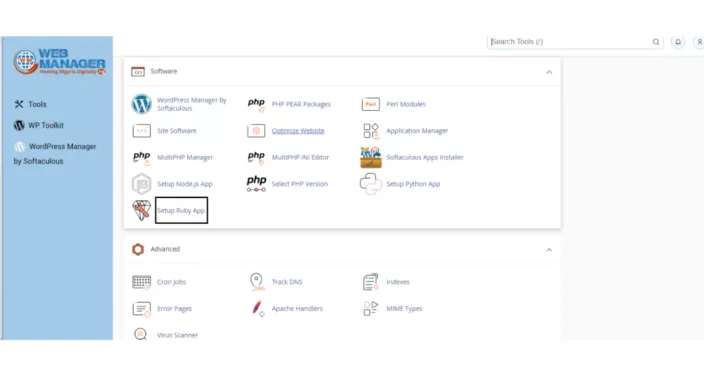
On the next page, you will be able to set up new applications and check Existing applications.
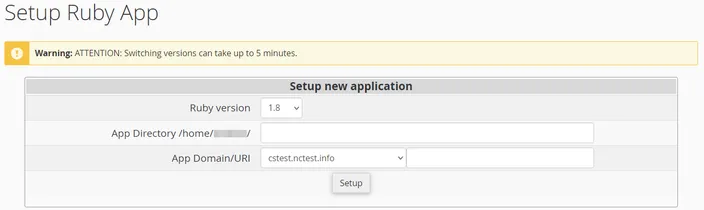
it is required to specify the Ruby version If you wish to create a new Ruby application, afterward, fill in the App Directory, and the App URI. Then click Setup.
Once the environment is set, you can upload your application files to the application root directory.
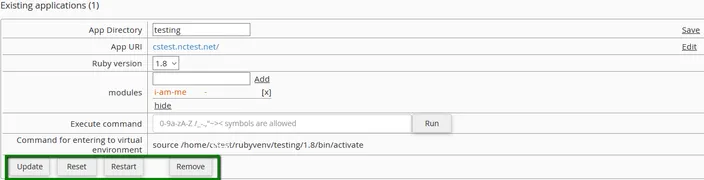
When the application is created, you will be able to see the next page.
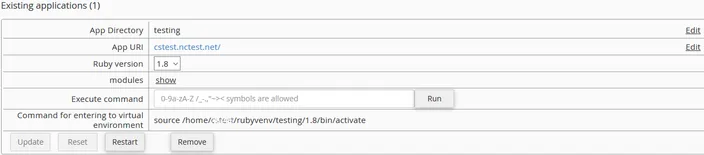
You can change the App Directory and the App URI using the Edit option near the corresponding field. After these changes are made, save them.

In the next drop-down menu, you can choose your preferred Ruby version.
It is important to note that the version switch can take up to 5 minutes
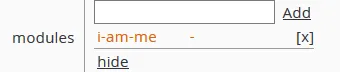
The module field can show, hide, add, and delete different Ruby modules. As soon as you start to type in the input field, appropriate hints will appear in the drop-down list. Choose the entry you prefer from the drop-down list and click Add.
If you click Delete, the corresponding module entry will disappear.
You can also execute simple commands from the web interface (e.g. you can install packages from specific repositories or control web applications by means of django-admin).

Remember the changes will not be applied to the application environment until the Update button clicks. All changes can be reverted by clicking the Reset button.
If you want to restart the application, click Restart.
To delete the application, click Remove, but the application folder itself will remain unmoved.
There you have it. If you encounter any issues setting the Ruby application Contact Us.