Viona W.08 Mar 2023Updated 15 Jul 2025Web Hosting1 min read

How to Change your PHP Version in cPanel

On this page

PHP plays a crucial role in cPanel by providing the foundation for dynamic web applications and allowing users to manage their websites and web hosting accounts with ease.

Using the right PHP version is very important in ensuring the optimal performance of your web application. Normally PHP version 7.4 is set as the default PHP version in most of our shared hosting servers.

But in case your website needs a higher or lower PHP version, then you can easily change it in your cPanel.

Steps To changing your PHP Version

STEP 1: Log in to your account on HostAfrica

STEP 2: Now you need to scroll down to the SOFTWARE section and click on the "Select PHP Version" option. Alternatively, you can also use the Search Bar to search for the PHP version.
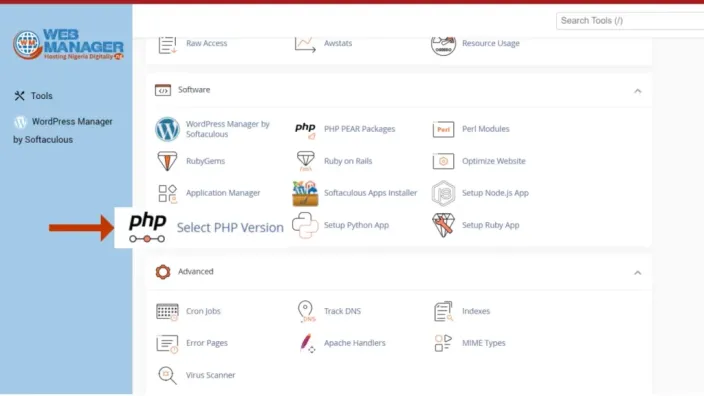
cPanel Software section with an arrow pointing to Select PHP Version

STEP 2: On the PHP Selector - Extension, select your required PHP version and click on "APPLY"
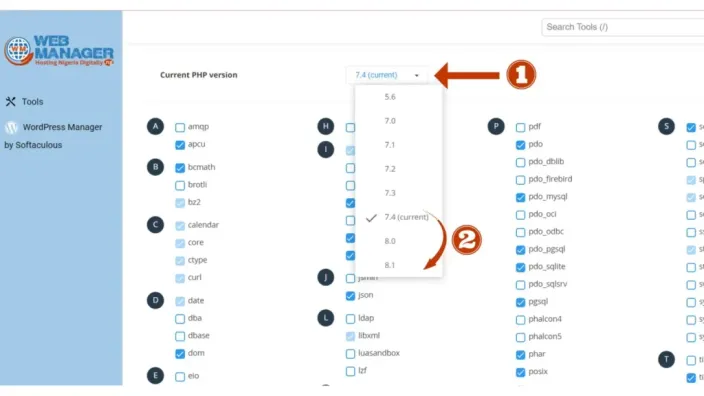
PHP version selector with the version dropdown open and the extension checkboxes listed

Congratulations! The PHP version is now changed for your selected domain.

Ready to put your site online?

Fast, reliable web hosting with free migrations and 24/7 support.

Avatar for Viona W.

Viona W.

The Author

With over 7 years of experience crafting tech content, Viona W is a valuable asset to the HostAfrica editorial team. Her skills extend beyond writing, as she also boasts experience in public relations and cultivating relationships with media outlets. This makes Viona adept at ensuring HostAfrica's achievements and initiatives gain well-deserved public recognition. When Viona isn't immersed in the world of tech, she enjoys seeking out new experiences in nature and the power of storytelling to create positive change.