New IP address - WHO IS this?
The phonebook may be outdated, but the idea upon which it was based is very much alive. We've basically taken the principles of the telephone directory and shifted it to the online realm where we can now search for IP addresses instead of phone numbers. That's essentially what a WHOIS lookup is. Start the domain name registration process today.
It shows you all the relevant details attached to a specific IP address anywhere in the world. And in standard human practice, we pay homage to its earlier iteration by including the cellphone number in the results (where allowed) as well.
TL;DR: What is WHOIS?
- WHOIS is a public database that shows information about a domain name or IP address.
- A WHOIS lookup lets you see details such as the domain owner (sometimes hidden), registrar, name servers, and the domain’s registration and expiry dates.
- The system is overseen by the Internet Corporation for Assigned Names and Numbers (ICANN) but the data is stored by domain registrars and registries worldwide.
- When you search a domain in a WHOIS tool, a query pulls its registration details from these databases and displays them.
- Some results show more information than others depending on the registry and privacy rules.
- WHOIS privacy protection can hide the domain owner’s personal details and replace them with the registrar’s contact information.
- Privacy laws like GDPR and South Africa’s POPIA already redact some personal data in WHOIS results.
- You can run a WHOIS lookup using online lookup tools or command-line tools on Windows or Linux.
Let's get into the guide and see how it's done.
What is WHOIS?
WHOIS is a public database that stores information about a domain or IP address that is accessible by performing a WHOIS lookup.
This information includes the name, email address, physical or postal address, and phone number of the domain owner, as well as the registration and expiry dates of the domain, the registrar’s name, email, phone number, name servers, and more.
The database has been maintained and regulated by The International Corporation for Assigned Names and Numbers (ICANN), an NPO that governs the regulation of domains, since 1982.
They require registrants (the person who registered the domain) to ensure that their information is always valid and kept up-to-date. And the deliberate provision of invalid information, or deliberate failure to update information on time, can lead to the cancellation of registration.
WHOIS is not a centrally-managed database running on the ICANN servers. Instead, it’s a distributed public directory, collectively managed by various registrars (companies that sell domain names to individuals and organisations) and registries (such as dot-org or dot-com). ICANN ensures that registrars and registries store and process WHOIS data in a compliant manner.
user@name:~$ whois google.com
  Domain Name: GOOGLE.COM
  Registry Domain ID: 2138514_DOMAIN_COM-VRSN
  Registrar WHOIS Server: whois.markmonitor.com
  Registrar URL: http://www.markmonitor.com
  Updated Date: 2019-09-09T15:39:04Z
  Creation Date: 1997-09-15T04:00:00Z
  Registry Expiry Date: 2028-09-14T04:00:00Z
  Registrar: MarkMonitor Inc.
  Registrar IANA ID: 292
  Registrar Abuse Contact Email: abusecomplaints@markmonitor.com
  Registrar Abuse Contact Phone: +1.2086851750
  Domain Status: clientDeleteProhibited https://icann.org/epp#clientDeleteProhibited
  Domain Status: clientTransferProhibited https://icann.org/epp#clientTransferProhibited
  Domain Status: clientUpdateProhibited https://icann.org/epp#clientUpdateProhibited
  Domain Status: serverDeleteProhibited https://icann.org/epp#serverDeleteProhibited
  Domain Status: serverTransferProhibited https://icann.org/epp#serverTransferProhibited
  Domain Status: serverUpdateProhibited https://icann.org/epp#serverUpdateProhibited
  Name Server: NS1.GOOGLE.COM
  Name Server: NS2.GOOGLE.COM
  Name Server: NS3.GOOGLE.COM
  Name Server: NS4.GOOGLE.COM
  DNSSEC: unsigned
  URL of the ICANN Whois Inaccuracy Complaint Form: https://www.icann.org/wicf/
>>> Last update of whois database: 2022-05-13T03:40:05Z <<<
How does WHOIS work?
At the heart of the WHOIS service lies the query protocol which is used to fetch the information of an IP address or domain name.
Basically, you type the domain name or IP into the WHOIS Lookup search, that query is sent to the database (scanning millions of records in mere seconds), and once an entry is found, sends the information back to you.
There are two different models that store and display this information:
- Thin model: A thin WHOIS search only returns information related to the name servers, domain status, registrar, registration and expiry dates. Other details, including the contact information of the domain owner, are stored with the registrar.
- Thick model: A thick WHOIS lookup returns much more information than a thin lookup, including the contact details of the owner.
The model used is entirely dependent on the registry, which is why some queries show more information than others.
At the time of registration, you are required to provide certain identifying information to your chosen registrar. The registrar will store this information in a secure database, and forward some of it to the relevant registry. Once the registration process finishes, you become the registrant of your domain.
All registrars provide you with the ability to update your information at any time. However, it may take up to 24 hours for the WHOIS database to display your updated information.
Is WHOIS privacy necessary?
This entirely depends on the domain TLD (.com, .ng, .org etc.) you've chosen, the privacy protection laws in your country as well as your own personal preference.
Many registrars offer domain privacy protection for TLDs that aren't protected by default. This protection replaces your personal information with the registrar's.
This way, when someone performs a WHOIS search, they get the email address and name of the registrar, and not the actual owner.
It’s worth mentioning that domain privacy doesn’t guarantee anonymity. Most registrars are legally bound to release private information under certain legal terms.
After the General Data Protection Regulation (GDPR) was enforced, ICANN released a document issuing guidelines on how registrants and registries should deal with WHOIS data. Some of the guidelines are as follows:
- Registrars and registries must consider the following fields as “redacted” unless the registrant has provided their explicit consent: registrant id, registrant name, registrant address, registrant postal code, registrant phone, registrant fax etc.
- Registrars must provide an official email to open communication channels with the public, and not include the registrant’s email in WHOIS responses.
- Email redaction also means that registrant emails can no longer be used for SSL certificate verification. Instead, an alternate email address (e.g. root@somedomain.com or admin@somedomain.com) must be used.
What this means is: if the domain TLD you've registered is issued by a registry that falls under the GDPR, you don't need to pay for additional WHOIS privacy. This includes all South African TLDs, as the POPI act provides this level of protection as well.
An example of a .co.za domain that's automatically protected:
Registrar URL: https://www.hostafrica.ng
Updated Date: 2021-06-22T05:12:11Z
Creation Date: 2021-06-22T05:11:24Z
Registry Expiry Date: 2022-06-22T05:11:24Z
Registrar Registration Expiration Date: 2022-06-22T05:11:24Z
Registrar: HostAfrica
Registrar Abuse Contact Email: support@hostafrica.com
Registrar Abuse Contact Phone: +27.215543096
Reseller:
Domain Status: ok https://icann.org/epp#ok
Registry Registrant ID: REDACTED
Registrant Name: REDACTED
Registrant Organization:
Registrant Street: REDACTED
Registrant City: REDACTED
Registrant State/Province: Eastern Cape
Registrant Postal Code: REDACTED
Registrant Country: ZA
Registrant Phone: REDACTED
Registrant Phone Ext: REDACTED
Registrant Fax: REDACTED
Registrant Fax Ext: REDACTED
Registrant Email: Please query the RDDS service of the Registrar of Record identified in this output for information on how to contact the Registrant, Admin or Tech contacts of the domain name.
An example of a .com domain with privacy protection enabled:
Domain Status: clientTransferProhibited https://www.icann.org/epp#clientTransferProhibited
Registry Registrant ID:
Registrant Name: Domain Administrator
Registrant Organization: See PrivacyGuardian.org
Registrant Street: 1928 E. Highland Ave. Ste F104 PMB# 255
Registrant City: Phoenix
Registrant State/Province: AZ
Registrant Postal Code: 85016
Registrant Country: US
Registrant Phone: +1.3478717726
Registrant Phone Ext:
Registrant Fax:
Registrant Fax Ext:
Registrant Email: pw-0540d1a99b43143aa5011f47add24bbd@privacyguardian.org
How to use WHOIS
Since WHOIS is an open-source protocol, anyone can use it to perform a lookup. There are several websites which make WHOIS lookup as easy as entering the domain and pressing enter. For example, our intuitive WHOIS search bar will give you all available information about any domain or IP address in the world.
You can also use different command-line tools as WHOIS clients. For example, you can download a WHOIS command-line tool from the official Microsoft website (more on this in the next section). On CentOS, you can install the whois package using the following command:
sudo yum install whois
The command to perform a whois search in a Linux base terminal is as simple as typing whois domainname.com
For some domain extensions, you may have to search via the domain’s registrar to fetch the details of the owner. Such searches are usually multi-step and may take longer to complete.
How to install WHOIS on Windows
There are two methods for installing and using WHOIS on Windows, the first is to install the Ubuntu terminal app via the Windows Store, and the second requires the WHOIS executable which works with command prompt.
Installing the Ubuntu App
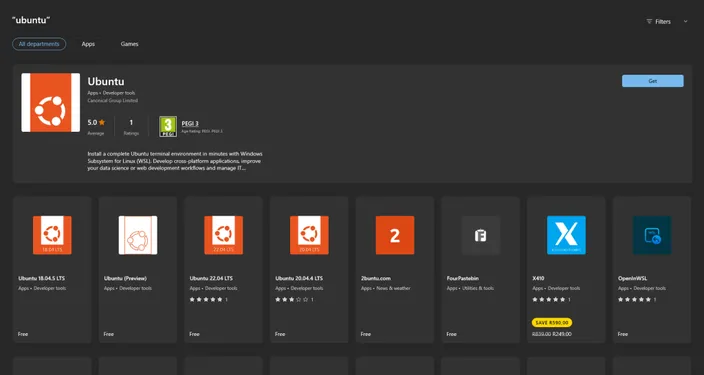
- Open the Windows Store, type Ubuntu into the search base and look for the Ubuntu App by Canonical. It will probably be the very first one.
- Click on the "Get" button and wait for it to install.
- Once installed, open the Ubuntu Terminal and use the whois command from the previous section.
Installing the WHOIS executable
-
Download the WHOIS executable from the Microsoft website.
-
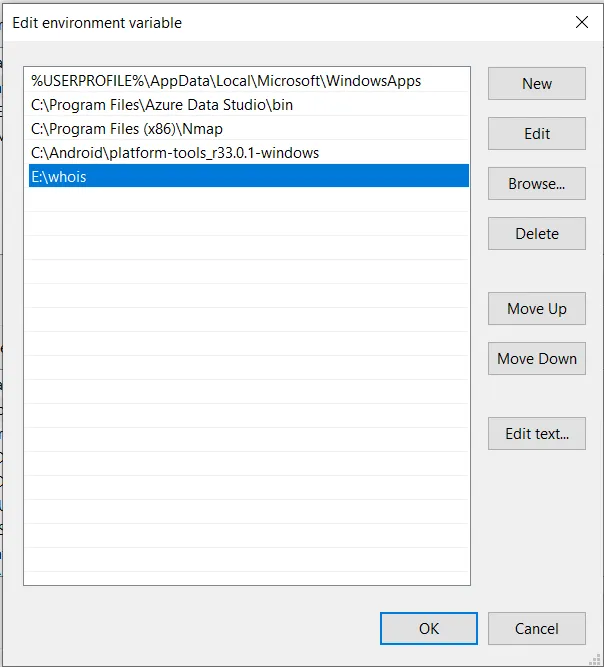
Create a new folder, and extract the downloaded .zip file inside it (e.g. E:\whois).
-
Open Control Panel -> Advanced System Settings -> Environment Variables.
-
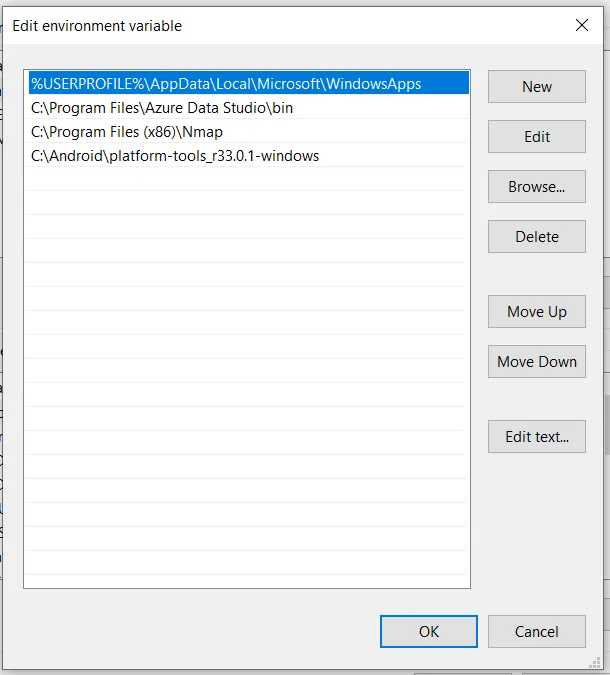
Find the Path variable, click Edit and then New.
-
Enter the path to the folder we created in step #2. Click Ok.
-
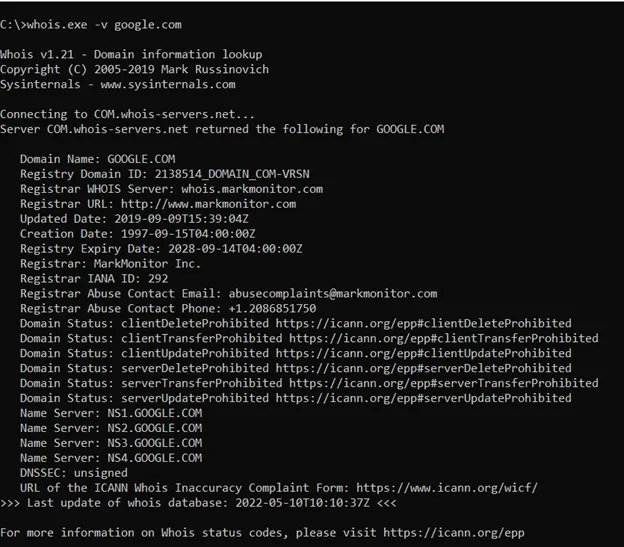
Now open command prompt, and use the following command to run WHOIS lookups:
whois.exe –v somedomain.com
For example, whois.exe –v google.com runs a WHOIS lookup for google.com.
So, WHOIS a pro at looking up IP addresses now? Go forth with your newfound knowledge and garner data on the IP addresses you wish to acquire or track. Just know, there’s a difference between sleuthing and stalking!
Frequently Asked Questions About WHOIS Lookup
How do I check who owns a domain name?
You can check who owns a domain by performing a WHOIS lookup using an online WHOIS search tool. Enter the domain name, and the tool will display the available registration information.
Is WHOIS lookup free?
Yes. Most WHOIS lookup tools are free to use and publicly accessible. Anyone can search for domain registration information online.
Why are some WHOIS details hidden?
Some WHOIS records hide personal details because of:
Domain privacy protection services
Data protection laws such as GDPR
Registry policies for certain domain extensions
In these cases, the registrar’s contact details are shown instead of the domain owner’s.
What information does a WHOIS search show?
A WHOIS search may show:
Domain name
Domain registrar
Registration date
Expiry date
Name servers
Domain status
Registrant contact details (if not hidden)
Can I find the owner of a domain using WHOIS?
Sometimes. A WHOIS lookup may show the domain owner’s name and contact details, but this information is often hidden due to privacy protection services or data protection laws. When privacy is enabled, the registrar’s contact details are shown instead.
Can WHOIS help check if a domain is available?
Yes. If a WHOIS lookup returns no registration record, the domain name is likely available for registration. If a record exists, the domain is already registered and the WHOIS results will show its registration details and expiry date.
Conclusion
WHOIS is an essential tool for understanding who owns a domain name and how it is registered. By performing a WHOIS lookup, anyone can quickly view important details such as the domain registrar, registration date, expiry date, and name servers.
While some personal information may appear in WHOIS results, privacy protections and data laws now ensure that sensitive details are often hidden. This allows WHOIS to remain a useful transparency tool for the internet while still protecting user privacy.
Whether you are buying a new domain, checking domain ownership, investigating suspicious websites, or monitoring domain registrations, a WHOIS lookup provides valuable insights that help you make informed decisions online.