Did you know you can create affiliate links for any HostAfrica Nigeria products e.g HMailPLus? The link generator in your affiliate dashboard makes it super easy to share the right product links, and track every click that earns you a commission.
What Is an Affiliate Link?
An affiliate link is a special tracking link that tells us which affiliate brought a customer to HostAfrica.
It looks something like this:
www.hostafrica.ng/web-hosting/?aff=2654
That little part at the end aff=2654 is your affiliate ID, and it’s how we know to credit you for the sale.
Note: That number at the end, aff=2654 is just an example. Your own affiliate link will have a different number that’s unique to you, that’s how we know which sales to credit to your account.
How to Generate Links for specific products
We’ve made it super easy inside your affiliate dashboard. Here’s how to use it:
Step 1: Go to the Affiliate Dashboard
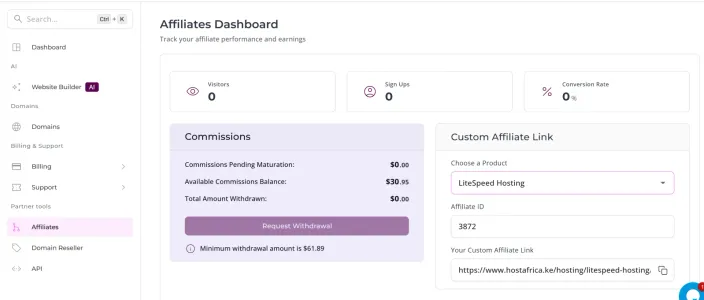
Log in to your client area. Open Affiliates in the left sidebar, under Partner tools. Your Affiliates Dashboard opens, with your visitors, sign ups and commissions in front of you.
Step 2: Choose your product
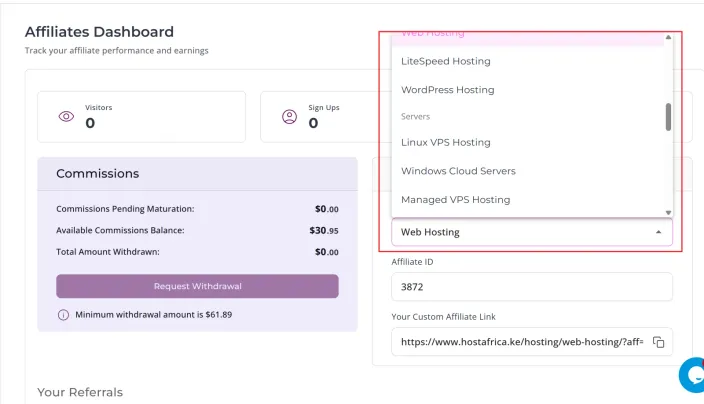
Find the Custom Affiliate Link card. Open the Choose a Product dropdown. Pick the product you want to promote.
Step 3: Copy the affiliate link and share it
Your link appears in the Your Custom Affiliate Link field, with your affiliate ID already in it. Click the copy button. Then use the link in a blog post, a YouTube description, a social media post or an email.
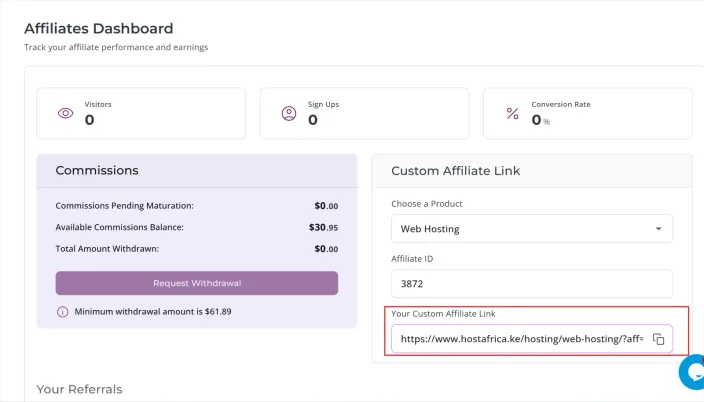
Note: You never type your affiliate ID. The panel fills it in for you, and your link updates the moment you pick a product.
Why this matters
By using the link generator in your affiliate dashboard, you make sure your link takes people directly to the exact product page you’re promoting, whether that’s HMailPlus, Web Hosting, VPS, or Website Builder. When your link goes straight to the right product, your audience instantly sees what you’ve been talking about, no searching, no confusion, no drop-offs.
👉 Read next: Top 5 profitable blog niches for affiliates in Nigeria
Final Thoughts
Your affiliate link is more than just a code, it’s your key to earning consistent commissions. Always make sure it directs customers to the right product page.
And if you ever need help creating engaging affiliate content or writing posts that convert, try the HostAfrica Affiliate Assistant.
Start sharing the right links today and make every click count!